Order management

Bakery order management software that keeps the whole cake workflow visible.

BatterBee helps home bakers manage orders from first enquiry through quote, confirmation, production, and handover in one connected workflow. Customer details, cake structure, quote status, stock blockers, reference photos, and costing all stay attached to the same order.

Orders are the operational centre of the app. The aim of this page is not to throw every detail at the reader at once, but to show that BatterBee covers the entire chain: customer enquiry, quote, stock awareness, baking workflow, handover, and the costing context behind it.

01

One workflow, not scattered notes

The order record brings together customer details, cake structure, notes, photos, costing, and next-step guidance in one place.

02

Built for the way bakers actually work

Move from enquiry to quote, through production, and into collection or delivery without swapping between multiple tools.

Inbox

Customer enquiries, extras, and custom cake requests stay visible before they become live orders.

Workflow

See the current stage, blockers, and next action without digging through the order.

Quote

Manage quote pricing, payment timing, and public quote sharing directly from the order context.

How the workflow fits together

From first message to final handover, the order has a clear path.

BatterBee turns the order into a bakery workflow rather than a static record. The baker can see what stage the order is in, what is blocking progress, and what needs doing next.

01

Enquiry

Capture customer requests from the storefront or create the order manually while gathering the brief.

02

Quote

Set the quote price, choose the payment timing, and share a public quote with the customer.

03

Confirmed

Bring the order into the live bakery plan once the customer has approved the details and payment step.

04

In production

Follow baking, decorating, and completion progress while keeping stock blockers visible.

05

Handed over

Record whether the finished order was collected or delivered and keep the full history intact.

What the baker can see

A rich order record, broken down into the parts that matter.

The order feature is dense because baking work is dense. The page is designed to make that detail easier to absorb over a longer scroll rather than cramming everything into one overwhelming admin table.

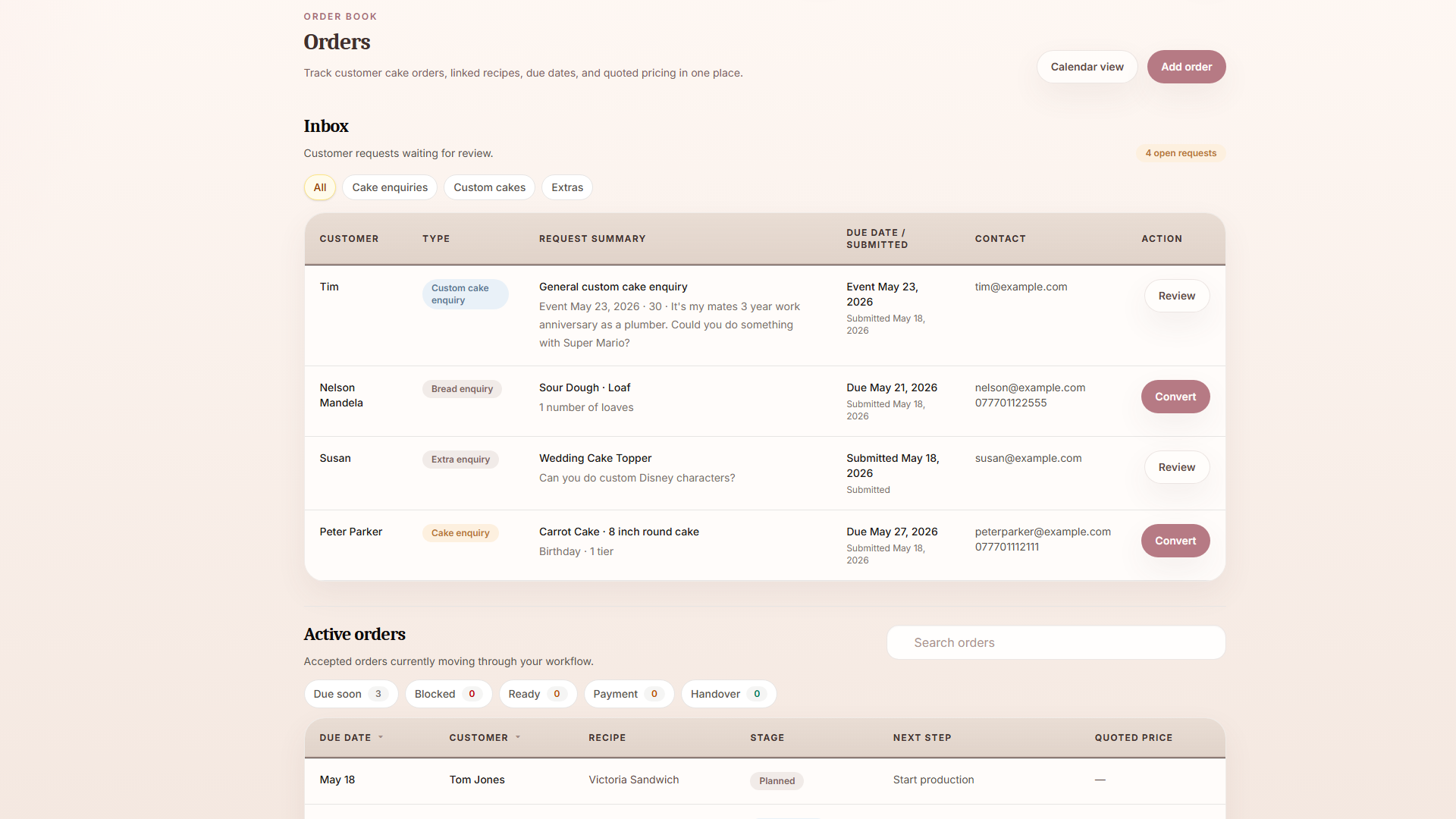
Orders inbox and active order book

See customer enquiries separately from the live work you are already committed to.

The orders index starts with the inbox, where storefront cake enquiries, extra-item requests, and custom cake conversations wait for review. Below that, the active orders list shows what is currently booked, who it is for, and what state each order is in.

  • Keep incoming enquiries visible until they are ready to become real orders.
  • Track active orders by customer, due date, workflow stage, and next action.
  • Reduce the need to hunt through messages to work out what is already in the pipeline.

At a glance, the baker can separate “things to review” from “things to make”.

Orders inbox and active orders
BatterBee orders inbox and active orders view

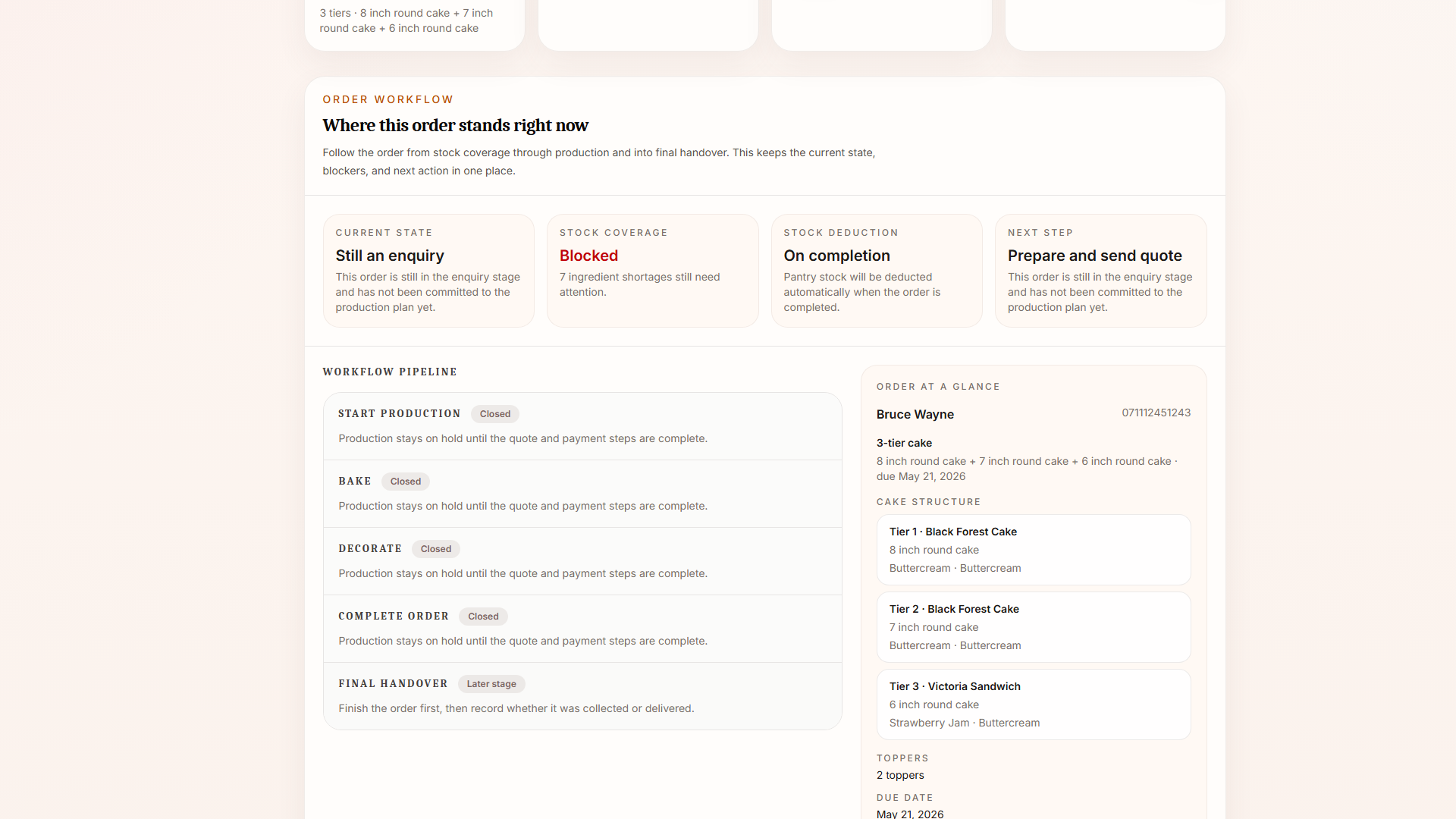
Workflow and blockers

The order page makes the current state, blockers, and next step obvious.

The workflow area is the operational heart of the order. It shows whether stock is covered, whether production is blocked, and where the order currently sits in the baking process. The baker can move the order forward step by step instead of relying on memory.

  • Track the workflow from quote through baking, decorating, completion, and handover.
  • See stock blockers in context before they become last-minute surprises.
  • Keep the next action visually prioritised so the page behaves like a production hub, not just a record view.

Useful while planning at the desk and while actively working through the bake.

Order workflow pipeline
BatterBee order workflow pipeline

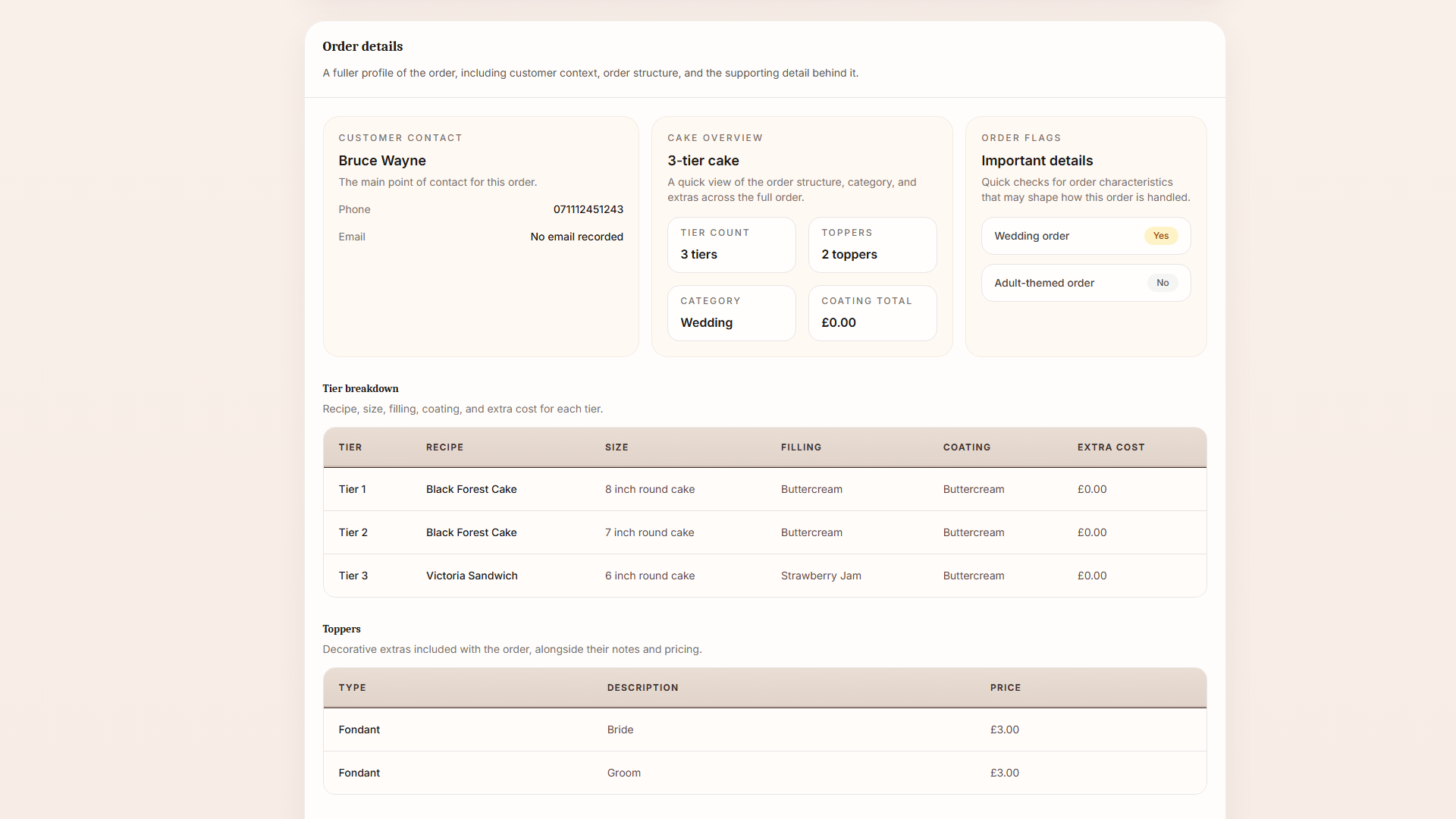
Order details, photos, and build context

Keep the full cake brief attached to the order instead of spread across different places.

Tier breakdowns, fillings, coatings, toppers, notes, reference images, and finished cake photos all sit inside the order. That means the baker can open one page and understand the build properly instead of reconstructing it from separate chats and notes.

  • Record the structure of the cake clearly, including multi-tier builds.
  • Store customer reference images alongside the working order.
  • Upload finished cake photos to keep a complete internal record.

The order becomes the single place where the brief and the finished result meet.

Order details and cake brief
BatterBee order details section

Quote and payment handling

Move from bakery costing into a customer-facing quote without losing context.

Quote price, deposit, payment timing, and the public quote link all sit inside the same order flow. That means the baker can decide whether the full amount is due now, whether only a deposit is needed, or whether payment should happen later, all from the order overview.

  • Share a public quote instead of rewriting the same information into a manual message.
  • Choose between full payment now, deposit now, or no payment required yet.
  • Keep payment verification and order confirmation tied to the same workflow.

The commercial side of the order stays joined up with the operational side.

Quote and payment view
BatterBee quote and enquiry workflow screen

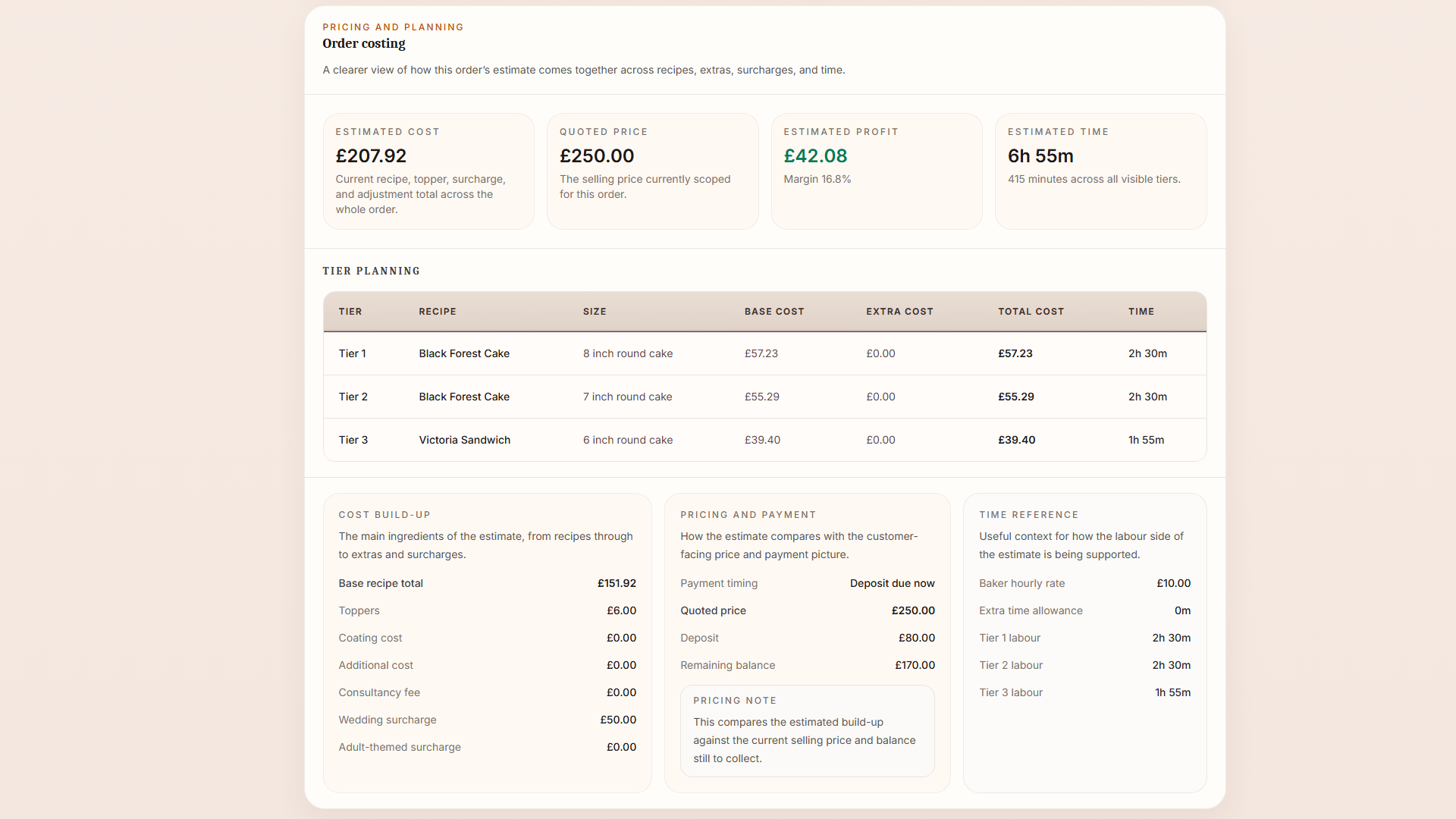
Costing and planning context

See what the order is expected to cost before deciding what to charge.

The costing area pulls together recipe cost, coatings, toppers, labour time, consultancy fees, and surcharges. It is not there to pretend every number is absolute truth, but to give the baker a grounded pricing reference before sending the quote.

  • Break down estimated cost by the parts of the build that actually matter.
  • Keep labour time and surcharge assumptions visible in the same order view.
  • Use the costing context as a guide while deciding the final quote.

A clearer pricing reference without turning the baker into an accountant.

Order costing breakdown
BatterBee order costing breakdown
What it replaces

Less message-chasing, less guesswork, less “where did I put that detail?”.

BatterBee is useful because it reduces common order-handling pain points rather than just storing data more neatly.

Scattered customer messages

Customer details, notes, and the cake brief stop living across multiple chat threads.

Forgotten due dates and next steps

The workflow makes it clear what stage the order is in and what needs doing next.

Missing production context

Reference images, cake structure, and stock blockers all stay attached to the order itself.

Manual quote handoffs

The quote and payment timing sit inside the same order flow instead of becoming a separate process.

Order workflow in practice

A calmer way to run real cake orders week after week.

BatterBee does not try to flatten complex cake work into a generic admin system. It gives bakers one place to review enquiries, manage the live order book, track progress, and keep the customer, production, and pricing sides of the order connected.

Cookies

BatterBee uses essential cookies and similar browser storage to keep the service secure, maintain sign-in sessions, and preserve in-progress form data during certain workflows. Learn more in our Cookie Policy.

View policy